



Here’s your gift: “Love 101.” I hope you find it helpful in creating a vision which can truly be yours.
Here are your download instructions for “Love 101”
Love 101 is in adobe reader, which most computers have. If it is not on your computer go to: www.adobe.com for a free download of adobe acrobat reader.
Once you click below where it says, “Click Here to Download,” Love 101 will appear. Here are some simple instructions:
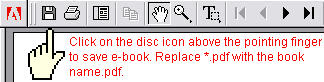
In the upper left hand corner of the ebook is a “disk icon.” Sliding your cursor over the icon it says, “saves a copy of the file.”
Click the icon and choose the folder where you want to store the ebook.
If you encounter problems, please email me.
My warmest regards,
Dr. Bob Huizenga